Premium Plugins
Enhance your signal detection capabilities with our premium plugins, each providing specialized functionality for advanced users.
IQ RECORDING (PREMIUM FEATURE)
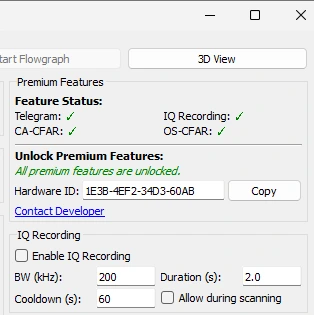
Record raw I/Q data of detected signals for advanced offline analysis.
- Configurable parameters: Recording bandwidth, cooldown period, and duration
- Compatible file format: Works with SDR# and other analysis tools
- Comprehensive metadata: Detailed signal information stored with each recording
- Automatic file naming: Organized with frequency and timestamp
- Easy access: Recordings stored in user's Documents folder
TELEGRAM INTEGRATION (PREMIUM FEATURE)
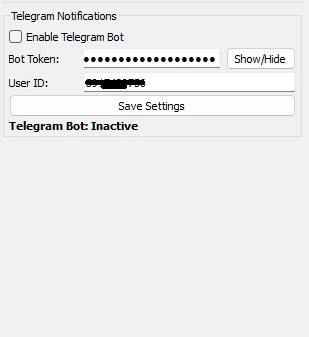
Receive real-time notifications of signal detections via Telegram for remote monitoring.
- Customizable notifications: Set minimum signal strength, cooldown periods
- Detailed information: Signal details and spectrograms included
- Multiple recipients: Support for multiple notification recipients
- Secure integration: Private Telegram channel connection
- Remote monitoring: Keep track of detections anywhere
ADVANCED CFAR DETECTION ALGORITHMS
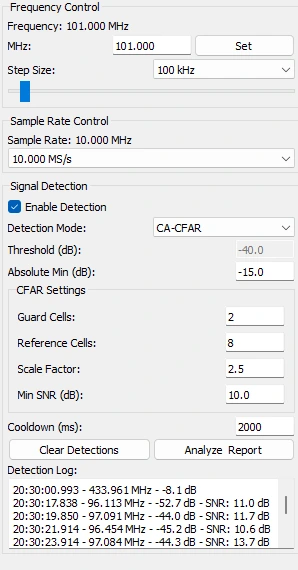
CA-CFAR (Cell Averaging CFAR)
Advanced adaptive threshold algorithm based on surrounding noise levels.
- Improved detection in varying noise environments
- Adjustable parameters: Guard cells, reference cells, scaling factor
- Reduced false positives compared to fixed threshold
- Compatible with all modes: Works in standard and 3D visualization
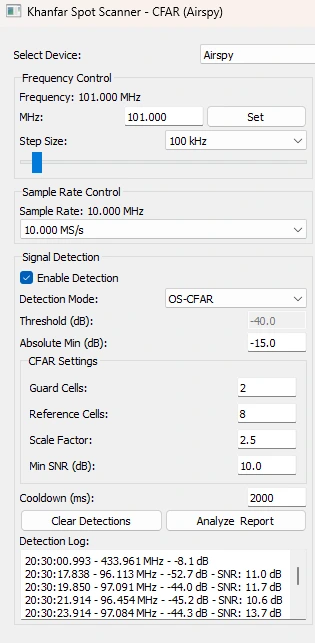
OS-CFAR (Ordered Statistics CFAR)
Superior detection algorithm for challenging RF environments with multiple signals.
- Superior performance in multiple signal environments
- Enhanced immunity to adjacent signals and interference
- Robust detection in challenging RF environments
- Customizable parameters: Adjustable percentile parameter
- Ideal for crowded spectrum monitoring
ACTIVATING PREMIUM FEATURES
Premium features can be activated by purchasing license codes from the official website. Each feature can be licensed individually based on your needs.
To activate a premium feature:
- Purchase the appropriate license from the official website
- Go to the License menu in the application
- Select the feature you wish to activate
- Enter your Hardware ID and the provided unlock code
- The feature will be immediately available after successful activation
IQ RECORDING USAGE
The IQ recording feature captures raw I/Q data whenever a signal is detected above your threshold settings. These recordings can be used for in-depth signal analysis in specialized software.
To use the IQ recording feature:
- Activate the IQ Recording feature with a valid license
- In the IQ Recording section of the control panel:
- Check the "Enable IQ Recording" box
- Set desired bandwidth in kHz
- Set cooldown period (minimum time between recordings of the same frequency)
- Set recording duration in seconds
- Optionally enable "Allow during scanning"
- When signals are detected, IQ files will be automatically created
- Access recordings in the configured recording directory
- Use SDR# or other RF analysis software to open the .iq files
The IQ files are stored in an interleaved 32-bit float format that is compatible with most SDR analysis software. Each recording includes a companion .txt metadata file with detailed signal parameters.
TELEGRAM INTEGRATION USAGE
The Telegram integration allows you to receive notifications about detected signals on your Telegram account or group.
To set up Telegram notifications:
- Activate the Telegram feature with a valid license
- Create a Telegram bot using BotFather in Telegram
- Configure your Telegram settings in the application:
- Enter your Bot Token
- Enter your Chat ID
- Set minimum signal strength for notifications
- Set cooldown period between notifications
- Test the connection using the test button
- Enable Telegram notifications
Once configured, the application will automatically send notifications with signal details when signals are detected above your specified threshold.
ADVANCED CFAR DETECTION USAGE
The advanced CFAR detection algorithms provide significantly improved signal detection capabilities in various RF environments.
To use the advanced detection algorithms:
- Activate the desired CFAR algorithm (CA-CFAR or OS-CFAR) with a valid license
- In the Detection Mode dropdown, select the activated CFAR algorithm
- Adjust the CFAR parameters:
- Reference cells: Number of cells used to estimate noise level
- Guard cells: Number of cells skipped to avoid signal leakage
- Scaling factor: Adjusts the detection sensitivity
- The software will now use the selected algorithm for all signal detection
Each CFAR algorithm has unique strengths:
- CA-CFAR: Better for environments with uniform noise
- OS-CFAR: Superior in environments with multiple signals or interference